Comparison
Zebra ZD621 vs ZD421: which 4-inch desktop printer?
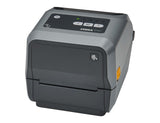
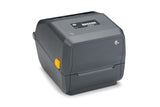
Same width, ribbons and buttons. The ZD621 adds speed, built-in Ethernet and serial, a media dancer and an optional touch display; the ZD421 offers a ribbon cartridge.
In this guide
The ZD621 and ZD421 are 4-inch desktop printers from the same Zebra platform and share one user guide. Both print up to 104 mm wide, take 74 m or 300 m ribbon rolls and use the same buttons and procedures. The ZD621 is the premium model: it prints faster, has Ethernet and serial ports built in, a media dancer for print quality and an optional colour touch display. The ZD421 is the lighter, lower-specified choice and the only one with a ribbon cartridge version.
| ZD621 | ZD421 | |
|---|---|---|
| Versions | ZD621d direct thermal, ZD621t ribbon roll, ZD621R RFID, linerless and healthcare models | ZD421d direct thermal, ZD421t ribbon roll, ZD421c ribbon cartridge, healthcare models |
| Resolution | 203 dpi; 300 dpi optional | Same |
| Max print speed | 203 mm/s (8 ips) at 203 dpi; 152 mm/s (6 ips) at 300 dpi | 152 mm/s (6 ips) at 203 dpi; 102 mm/s (4 ips) at 300 dpi |
| Max print width | 104 mm at 203 dpi; 108 mm at 300 dpi | Same |
| Media width | 15–108 mm (direct thermal), 15–118 mm (thermal transfer) | 15–108 mm (ZD421d), 15–112 mm (ZD421t), 15–118 mm (ZD421c) |
| Media roll | Up to 127 mm diameter; 12.7 or 25.4 mm core, 38.1–76.2 mm with adapters | Same |
| Ribbon | 74 m or 300 m roll, 33.8–109.2 mm wide | ZD421t: 74 m or 300 m roll, 33.8–109.2 mm wide. ZD421c: 74 m cartridge |
| Media dancer | Yes | No |
| Controls | 5 status lights, 3 buttons; optional 4.3-inch colour touch display | 5 status lights, 3 buttons, no display |
| Standard ports | USB 2.0, USB host, Ethernet 10/100, RS-232 serial, Bluetooth Low Energy for the setup app | USB 2.0, USB host, Bluetooth Low Energy for the setup app |
| Optional connectivity | Wi-Fi 6 (802.11ax) with Bluetooth 5.3, or Wi-Fi 5 (802.11ac) with Bluetooth | Same wireless options, plus Ethernet or serial modules |
| RFID | UHF RFID on the ZD621R | Not available |
| Options | Dispenser, cutter, 2750 mAh battery | Same |
| Memory | 512 MB flash, 256 MB SDRAM | Same |
| Size and weight, thermal transfer (L × W × H) | 267 × 202 × 192 mm, 2.5 kg | 267 × 202 × 189 mm, 2.05 kg (ZD421t) |
| Size and weight, direct thermal (L × W × H) | 221 × 177 × 151 mm, 1.6 kg | 220.8 × 177.5 × 150.7 mm, 1.35 kg |
| Operating temperature | 4.4–41 °C | Same |
Figures from Zebra's ZD600 Series and ZD421 spec sheets; speeds are maximums.
Choose the ZD621 if
- You print large batches and want up to 203 mm/s
- You need Ethernet or a serial port out of the box, for example for a network or an older system
- Several people use the printer and a touch display with wizards and plain-text alerts helps them
- You want the media dancer that Zebra adds for print quality
- You need RFID or linerless labels
Choose the ZD421 if
- The printer sits next to one PC on USB, and 152 mm/s is fast enough
- You want the quick-change ribbon cartridge of the ZD421c
- You may add Ethernet, serial or Wi-Fi later, as you need them
- A lighter printer matters
What both printers share
Zebra documents the ZD421 and ZD621 in one user guide. Labels and 74 m or 300 m ribbon rolls load the same way, and the buttons work the same: SmartCal is PAUSE + CANCEL, the configuration report FEED + CANCEL. The five status lights have the same meanings, both speak ZPL and EPL, and both take the same kinds of options: battery, dispenser and cutter. Ribbon rolls fit both the ZD621t and the ZD421t; cartridges fit only the ZD421c.
Both can ship with Zebra's extra EU security when bought in Europe from 1 August 2025; affected models then need a Protected Mode password during setup, as explained in our ZD621 setup guide.
Where they really differ
Speed and print quality
At 203 dpi the ZD621 prints up to 203 mm/s against 152 mm/s on the ZD421, about a third faster. It also has a media dancer, which Zebra lists as a print quality feature; the ZD421 has none.
Display and connectivity
The ZD621 can have a 4.3-inch colour touch display with menus, setup wizards and alerts in plain text; the ZD421 always works with lights and buttons only. Every ZD621 has Ethernet and serial ports; on the ZD421 they are add-on modules.
Video: Zebra Technologies
Compare the models in our shop: ZD621t 203 dpi, ZD621d 203 dpi, ZD421t 203 dpi and ZD421d 203 dpi. More guides: ZD621 and ZD421.
Frequently asked questions
Is the ZD621 faster than the ZD421?
Yes. At 203 dpi the ZD621 prints up to 203 mm/s and the ZD421 up to 152 mm/s. At 300 dpi it is 152 against 102 mm/s.
Do the ZD621t and ZD421t use the same ribbons?
Yes. Both take 74 m and 300 m ribbon rolls from 33.8 to 109.2 mm wide. Only the ZD421c uses ribbon cartridges.
Does the ZD421 have a touch display?
No. The ZD421 has five status lights and three buttons. Of the two, only the ZD621 offers a colour touch display.
Can I add Ethernet to the ZD421 later?
Yes. Ethernet and serial are field-installable modules for the ZD421. On the ZD621 both are built in.
Was this guide helpful?
More Zebra ZD421 guides
ZD411
ComparisonZebra ZD421 vs ZD411: 4-inch or 2-inch desktop printer?5 min · Easy
ZD421
SetupZebra ZD421 setup guide: from unboxing to first label20 min · Easy
ZD421
TroubleshootingZebra ZD421 lights and errors: what they mean and how to fix them10 min · Easy
ZD421
How-toReset a Zebra ZD421 to factory defaults10 min · Easy
ZD421
How-toCalibrate the Zebra ZD421: SmartCal and manual calibration10 min · Easy
ZD220
How-toPrint 100×150 mm shipping labels on Zebra ZD220, ZD230 and ZD42110 min · Easy
Still stuck?
Contact support
Send us your model and a short description of the problem. Our team will help you find a solution.