Comparison
Honeywell PC42E-T vs PC42E-D: which desktop printer to buy
Two different designs: the PC42E-T prints with or without ribbon; the newer PC42E-D is direct thermal, faster, smaller and has serial built in.
In this guide
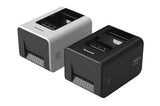
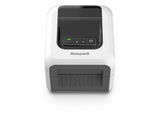
The names suggest a ribbon and a no-ribbon version of the same printer, but they are two different designs. The PC42E-T is a thermal transfer printer that also prints direct thermal. The PC42E-D is Honeywell's newer, smaller direct thermal printer from the PC41E-D/PC42E-D family, with a fuller control panel, built-in serial port and more memory. Choose the PC42E-T when you need ribbon printing for durable labels. Choose the PC42E-D for shipping, product and other direct thermal labels.
| PC42E-T | PC42E-D | |
|---|---|---|
| Print method | Thermal transfer and direct thermal | Direct thermal only |
| Resolution of our version | 300 dpi (12 dots/mm) | 203 dpi (8 dots/mm) |
| Max speed | 127 mm/s (5 ips) at 300 dpi; 152 mm/s (6 ips) at 203 dpi | Up to 203 mm/s (8 ips) at 203 dpi, depending on the job; 152 mm/s (6 ips) at 300 dpi |
| Ribbon | Ink-out, 25.4–110 mm wide; up to 300 m on a 1 in core or 74 m on a 0.5 in core | None |
| Label roll cores | 25.4 and 38.1 mm | 12.7, 25.4 and 38.1 mm |
| Memory | 128 MB flash, 128 MB SDRAM | 256 MB flash, 256 MB SDRAM |
| Interfaces | USB device, USB host, Ethernet; serial with the optional USB-to-serial cable | USB device, USB host, Ethernet, serial |
| Controls | Print and ECO buttons, one Status LED | Print/Feed, ECO, Pause and Cancel buttons; Status LED and Supplies, Pause and Network indicators |
| Media low sensor | Not listed | Factory option (not in our version) |
| Printer languages | DP, DPL, ZSim2 (ZPL II), ESim (EPL), XML | Same, plus IPL and TPCL (TPCL at 203 dpi only) |
| Size (L × W × H) and weight | 273 × 198 × 168 mm, 2.04 kg | 222 × 184 × 174 mm, 1.5 kg |
| Housing of our version | Black | White |
| Max print width | 108 mm | Same |
| Label width | 25.4–114 mm | Same |
| Min label length (tear-off) | 9.6 mm | Same |
| Max roll diameter | 127 mm | Same |
| Wireless | Optional Wi-Fi 5 and Bluetooth 5.0 module | Same |
| Media handling options | Cutter, peel-off | Same |
| Power | 90–264 V input, 24 V DC 2.5 A power supply | Same |
| Operating temperature | 5–40 °C | Same |
| Warranty (Honeywell) | 1 year printer, 1 year printhead | Same |
Figures from Honeywell's PC42E-T data sheet (Rev C, 08/24) and PC41E-D/PC42E-D data sheet (Rev B, 06/26); our versions decoded from Honeywell's PC41/PC42 configuration guide. Both models are also made in 203 and 300 dpi versions, and the PC42E-D comes in black or white. Honeywell rates the PC42E-D for up to 1,000 labels a day and positions the PC42E-T for mid-volume printing.
Choose the PC42E-T if
- Your labels must stay readable for a long time, or face heat, sunlight or handling: thermal transfer with a suitable ribbon suits these
- You want one printer for both ribbon labels and direct thermal labels
- You print small text or small barcodes and want our 300 dpi version
Choose the PC42E-D if
- You print shipping labels, receipts or other short-life labels
- You want the higher top speed and no ribbons to buy or change
- You connect by serial without an adapter, or want Pause, Cancel and a media-out light on the printer
- Desk space is tight
What both printers share
Both print up to 108 mm wide on labels 25.4–114 mm wide, from rolls up to 127 mm in diameter. Both have USB and Ethernet as standard, a printer web page, and use Honeywell's InterDriver for Windows. The print button works the same way: hold it for 2 seconds to calibrate, or about 6 seconds to calibrate and print a configuration label. The ECO button switches between fast and slow calibration on both. Our PC42E setup guide and calibration guide cover both models.
Options and accessories
Wi-Fi and Bluetooth are not built in; both use Honeywell's optional Wi-Fi/Bluetooth module, which is fitted afterwards. Honeywell also lists a cutter and a peel-off module for both models. Honeywell lists the PC42E-D media low sensor as factory-installed, so choose it when ordering. Accessories are not interchangeable across the board: printheads, for example, have separate part numbers for the two models.
More guides: PC42E-T · PC42E-D.
Frequently asked questions
Is the PC42E-D the direct thermal version of the PC42E-T?
Not exactly. It belongs to Honeywell's newer PC41E-D/PC42E-D family, with a different housing, a larger control panel and more memory. The PC42E-T itself can also print direct thermal labels.
Can the PC42E-T print without a ribbon?
Yes. With direct thermal labels it prints without a ribbon; set the print method to direct thermal.
Which is faster, the PC42E-T or the PC42E-D?
The PC42E-D: up to 8 ips (203 mm/s) at 203 dpi, depending on the job. The PC42E-T reaches 6 ips at 203 dpi and 5 ips at 300 dpi.
Do the PC42E-T and PC42E-D have Wi-Fi?
Not as standard. Both accept Honeywell's optional Wi-Fi/Bluetooth module, and both have Ethernet built in.
Was this guide helpful?
More PC42E D guides
Still stuck?
Contact support
Send us your model and a short description of the problem. Our team will help you find a solution.