Comparison
Zebra DS2208 vs DS4608: which corded 2D scanner?
General-purpose or premium: the DS4608 reads codes from almost twice as far, handles smaller codes and survives harder drops than the DS2208.
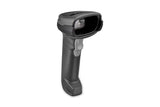
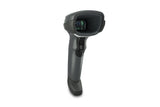
In this guide
Both are corded Zebra 2D imagers that read 1D and 2D bar codes on paper and on phone screens, and both carry a five-year Zebra warranty. The DS2208 is the general-purpose model for everyday EAN and QR codes at a till. The DS4608 is the premium model: a higher-resolution imager reads codes from almost twice as far, handles smaller and denser codes, and the housing is rated for harder drops. It also comes in special versions for high-density codes and direct part marks.
| DS2208 | DS4608 | |
|---|---|---|
| Image sensor | 640 × 480 pixels | 1280 × 800 pixels |
| Read range, 13 mil EAN/UPC | 1.3–36.8 cm | 0–71.1 cm (SR) |
| Read range, 20 mil QR Code | 0–27.9 cm | 0–44.5 cm (SR) |
| Read range, 10 mil Data Matrix | 0.8–15.7 cm | 2.5–29.2 cm (SR) |
| Smallest Code 39 element | 4.0 mil | 3.0 mil (SR); 2.0 mil (HD) |
| Imager versions | Standard imager | SR standard range, HD high density, DPE for direct part marks on electronics, and others |
| OCR and other extras | Not listed | OCR-A, OCR-B, MICR, US currency, dotted Data Matrix |
| Drop | Multiple 1.5 m drops to concrete | Multiple 1.8 m drops to concrete |
| Tumble | 250 tumbles of 0.5 m | 2,000 tumbles of 0.5 m |
| EAS tag deactivation | Not listed | Checkpoint EAS on selected HD versions |
| Operating current (typical) | 250 mA | 340 mA |
| Sealing | IP52 | Same |
| Interfaces | USB, RS-232, keyboard wedge, IBM 46XX | Same |
| Keyboard layouts | Over 90 international keyboards | Same |
| Weight | 161.6 g | 161.9 g |
| Decode software | PRZM decode algorithms, Direct Decode Indicator | Same |
| Zebra warranty | 5 years | Same |
Figures from Zebra's DS2200 Series and DS4600 Series spec sheets and the Product Reference Guides. Read ranges are typical and depend on print quality and light.
Choose the DS2208 if
- You scan standard EAN, QR and shipping labels at a till or desk
- Items are brought close to the scanner
- You equip many workstations and want the general-purpose model
Choose the DS4608 if
- You reach heavy items at the bottom of a trolley, up to about 70 cm away
- Codes are small, dense or damaged, or you need to read OCR text
- Scanners get dropped often, for example in a warehouse or busy store
- You need the HD version for tiny codes or the DPE version for direct part marks
What stays the same
Setup and settings work the same way. Both plug in as a USB keyboard, both use the same Gooseneck Intellistand part (20-71043-04R) for hands-free scanning, and both are configured with Zebra's free 123Scan utility. The DS4608 Product Reference Guide uses the same names as the DS2208 Product Reference Guide for the country keyboard types, the Enter and Tab bar codes and the reset bar codes. Our keyboard layout guide therefore applies to both; for the DS4608 page numbers see the DS4608 and DS4678 setup guide.
Video: Zebra Technologies
Cordless versions
Both families have a cordless sibling. The DS2278 pairs with the DS2208, the DS4678 with the DS4608. On the DS4678, Zebra's spec sheet lists Wi-Fi Friendly Mode, Virtual Tether and a Class 1 Bluetooth radio with up to 100 m range. See DS2208 vs DS2278 and DS4608 vs DS4678.
Compare both models in our shop: DS2208 and DS4608.
Frequently asked questions
Is the DS4608 worth it over the DS2208 for a normal shop till?
For standard EAN and QR codes held close to the scanner, the DS2208 does the job. The DS4608 pays off with long reach, small or damaged codes and frequent drops.
Can both scanners read QR codes on phone screens?
Yes. Both read 1D and 2D codes from paper and from mobile phone displays.
What is the difference between DS4608 SR and HD?
SR is the standard range imager for everyday codes. HD is the high-density imager for very small codes, down to 2.0 mil Code 39. On standard-size codes such as EAN/UPC and QR its range is shorter.
Was this guide helpful?
More Zebra DS2208 guides
DS2208
ComparisonZebra LS2208 vs DS2208: 1D laser or 2D imager?5 min · Easy
DS2208
ComparisonZebra DS2208 vs DS2278: corded or cordless scanner?5 min · Easy
DS2208
TroubleshootingZebra DS2208 and DS2278 troubleshooting: beeps, LEDs and fixes10 min · Easy
DS2208
How-toZebra DS2208 types wrong characters? Set the keyboard layout5 min · Easy
DS2208
How-toZebra DS2208 and DS2278: add or remove Enter or Tab after scans5 min · Easy
DS2208
SetupZebra DS2208 and DS2278 setup: USB, cradle and Bluetooth15 min · Easy
Still stuck?
Contact support
Send us your model and a short description of the problem. Our team will help you find a solution.