Comparison
Zebra LS2208 vs DS2208: 1D laser or 2D imager?
The LS2208 reads printed 1D bar codes from further away; the DS2208 adds QR codes, phone screens and point-and-shoot aiming. Here is how to choose.
In this guide
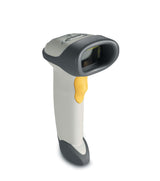
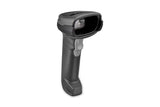
The deciding question is what you scan. The LS2208 reads printed 1D bar codes only, and reads standard EAN/UPC codes from further away. The DS2208 reads the same 1D codes plus QR codes and other 2D codes, also from phone screens, and you do not need to line it up with the code. If any of your codes are 2D or on screens, choose the DS2208.
| LS2208 | DS2208 | |
|---|---|---|
| Technology | 1D laser, single scan line (650 nm laser diode) | 1D/2D imager, 640 × 480 pixel sensor |
| Reads | 1D bar codes: EAN/UPC, Code 128, GS1-128, Code 39, Interleaved 2 of 5, GS1 DataBar and more | The same 1D codes plus 2D: QR Code, Data Matrix, PDF417, Aztec, MaxiCode and more |
| Codes on phone screens | Zebra lists paper 1D coupons as the use case | Zebra lists electronic coupons; no special mode needed for phones |
| Aiming | The scan line must cross every bar | Omnidirectional: no need to line up the code |
| Read range, 13 mil EAN/UPC | 0–63.8 cm | 1.27–36.8 cm |
| Smallest Code 39 element | 3 mil | 4 mil |
| Minimum print contrast | 20 % | 25 % |
| Sealing | IP30 | IP52 |
| Drop | Multiple 1.5 m drops to concrete | Same |
| Tumble test | 500 tumbles in a 0.5 m tumbler | 250 tumbles in a 0.5 m tumbler |
| Ambient light | Up to 86,080 lux | Up to 107,600 lux |
| Operating temperature | 0–50 °C | Same |
| Size (H × W × D) | 15.2 × 6.4 × 8.5 cm | 16.5 × 6.6 × 9.9 cm |
| Weight | 150 g | 161.6 g |
| Operating current (typical) | 175 mA | 250 mA |
| Interfaces | USB, RS-232, keyboard wedge, IBM 46XX | Same; LS2208 cables fit |
| Keyboard layouts | Over 90 international keyboards | Same |
| Zebra warranty | 5 years, plus limited lifetime warranty on the scan element | 60 months |
Figures from Zebra's LS2208 spec sheet and DS2200 Series spec sheet. Read ranges depend on print quality, contrast and light. Zebra counts tumbles differently for the DS2200 Series (one tumble is half a cycle), so the tumble figures are not directly comparable.
Choose the LS2208 if
- All your codes are printed 1D bar codes: EAN on products, Code 128 on shipping labels, library or asset labels
- You often scan standard EAN codes from a distance, up to about 60 cm
- You read very small, high-density 1D codes
- You replace an existing LS2208 and want the same behaviour
Choose the DS2208 if
- You need QR codes, GS1 DataMatrix, PDF417 or any other 2D code
- Customers show tickets, vouchers or loyalty cards on a phone
- Staff should scan without lining up the code, for example in a busy checkout
- You want better sealing against dust and dripping water: IP52 against IP30
What both scanners share
Both are corded handheld scanners from Zebra with the same interfaces: USB, RS-232, keyboard wedge and IBM 46XX. Zebra states that the DS2200 Series uses the same universal cables as the LS2208, so you can keep existing cables when moving to the DS2208. Both work as a USB keyboard out of the box, support over 90 international keyboard layouts, switch to hands-free scanning when placed in their stand, and are configured with programming bar codes or Zebra's free 123Scan utility.
The settings are similar but not identical. For example, keypad emulation is on by default on the DS2208 and off on the LS2208, and the LS2208 enables fewer bar code types out of the box. Use the guide for your model: LS2208 programming or DS2208 keyboard layout.
Video: Zebra Technologies
Is the LS2208 being replaced?
Not according to Zebra. In October 2026 Zebra still lists the LS2208 as a current product, describes it as its best-selling 1D handheld scanner and names no successor. Zebra presents the DS2200 Series as the way to add 2D scanning, with the note that LS2208 cables can be reused when upgrading.
Compare both in our shop: Zebra LS2208 and Zebra DS2208. Setup steps are in our LS2208 setup guide and DS2208 setup guide.
Frequently asked questions
Can the Zebra LS2208 read QR codes?
No. The LS2208 is a 1D laser scanner. To read QR codes, choose a 2D imager such as the DS2208.
Does the DS2208 read normal EAN bar codes as well?
Yes. It reads the same 1D bar codes as the LS2208, plus 2D codes. Its range on standard EAN/UPC codes is shorter: up to 36.8 cm against 63.8 cm.
Can I use my LS2208 cable with a DS2208?
Yes. Zebra states that the DS2200 Series is backwards compatible with LS2208 series cables.
Which scanner reads codes on mobile phone screens?
The DS2208. Zebra positions it for electronic coupons and loyalty cards, and its guide says phone bar codes need no special mode.
Was this guide helpful?
More Zebra DS2208 guides
DS2208
ComparisonZebra DS2208 vs DS4608: which corded 2D scanner?5 min · Easy
DS2208
ComparisonZebra DS2208 vs DS2278: corded or cordless scanner?5 min · Easy
DS2208
TroubleshootingZebra DS2208 and DS2278 troubleshooting: beeps, LEDs and fixes10 min · Easy
DS2208
How-toZebra DS2208 types wrong characters? Set the keyboard layout5 min · Easy
DS2208
How-toZebra DS2208 and DS2278: add or remove Enter or Tab after scans5 min · Easy
DS2208
SetupZebra DS2208 and DS2278 setup: USB, cradle and Bluetooth15 min · Easy
Still stuck?
Contact support
Send us your model and a short description of the problem. Our team will help you find a solution.